|
For the latest stable version, please use Unifly Services v4.8! |
Unifly GCS API Developer Guide
Download the specifications:
This guide helps developers integrate Ground Control Stations with the Unifly UTM Platform using the GCS API.
|
API Base URL: |
Getting Started
Prerequisites
Before using the GCS API, you need:
-
A valid Unifly Operator account
-
An API key for authentication

Using the REST API Documentation
The REST API documentation is an interactive OpenAPI documentation that helps you understand the API endpoints.
Understanding the Structure
The documentation is organized by tags/categories:
Main Sections
The left sidebar shows the main API categories (tags):
-
Flight Status - for managing flight execution
-
Operations - for planning and managing operations
-
PermissionRequests - for authorization workflows
-
UAS - for drone fleet management
-
Geofences - for airspace information
Endpoint Documentation
Each endpoint shows:
-
HTTP Method & Path
-
The HTTP verb (GET, POST, etc.)
-
The endpoint path with any path parameters
-
-
Parameters
-
Path parameters - variables in the URL path
-
Query parameters - optional URL parameters
-
Header parameters - required headers
-
Request body - payload structure if needed
-
-
Responses
-
Success responses with example payloads
-
Error responses with error codes
-
Response schema descriptions
-
|
Click an endpoint to expand its full documentation including all parameters, request/response examples and possible error scenarios. |
Reading an Endpoint
Taking the takeoff endpoint as an example:

Each endpoint documentation shows:
-
The HTTP method (POST, GET, etc.) and endpoint path
-
Required parameters:
-
Path parameters (like {serialNumber})
-
Header parameters (like apikey)
-
-
Expected responses:
-
Success responses (200, 201)
-
Error responses (401, 403, 404, 409)
-
-
Sample request/response payloads
|
Click the endpoint to expand and see all details including sample responses. |
Using the MQTT API Documentation
The MQTT API documentation is an interactive AsyncAPI documentation that helps you understand the available MQTT topics and message formats.
API Flow Overview
The typical flow for using the GCS API follows these steps:
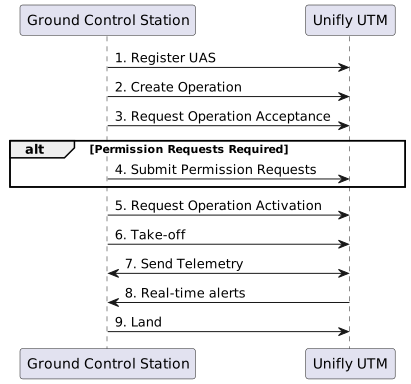
-
Register UAS (REST)
-
Create Operation (REST)
-
Request Operation Acceptance (REST)
-
Submit Permission Requests (REST)
-
Request Operation Activation (REST)
-
Take-off (REST)
-
Send Telemetry (MQTT)
-
Real-time alerts (MQTT)
-
Land (REST)
1. Register UAS
Before you can start any operation, you need to register your UAS (drone) in the system. This creates a digital representation of your drone that can be used in operations.
API Reference
Refer to the Create UAS endpoint in the API documentation.
2. Create Operation
Creating an operation defines when and where you plan to fly. Operations management involves several API endpoints for the complete lifecycle.
API Reference
-
Create Operations: Operations endpoints
-
Operation Details: Operation Details endpoint
-
Operation Lifecycle Management:
-
Acceptance: Request Acceptance endpoint
-
Activation: Request Activation endpoint
-
Withdrawal: Request Withdrawal endpoint
-
End: Request End endpoint
-
Key Concepts
- Operation States
-
An operation goes through several states:
-
DRAFT → Initial state
-
PENDING_ACCEPTANCE → Waiting for acceptance
-
ACCEPTED → Operation accepted
-
PENDING_ACTIVATION → Waiting for activation
-
ACTIVATED → Ready for execution
-
ENDED/WITHDRAWN → Terminal states
-
|
Operations must be created with sufficient lead time before the planned flight to allow for validation and authorization processes. |
Selecting Flight Rules, Pilot, and Observers
When creating an operation, make sure to provide the following fields in the request body:
-
rulesetCode– code of the applicable operational rules (e.g.,opena1). See the API reference for supported values. -
lineOfSightType– how the mission will be flown (e.g.,VLOS). See the API reference for supported values. -
pilotUuid– UUID of the pilot-in-command. Retrieve candidates with the List Pilots Example. -
observerUuids– (optional) array of UUIDs of observers.
The same UUID as the pilot is not allowed.
If no observers are needed for the operation, this field can be left out.
Retrieve candidates with the List Observers Example.
See Create Operation Example for a complete payload.
3. Request Operation Acceptance
After creating an operation and passing initial validation, you need to request acceptance. This step initiates the authorization process.
API Reference
Use the Request Acceptance endpoint to move your operation to the acceptance phase.
|
Some operations may require additional permission requests after acceptance. Monitor the operation status for any such requirements. |
4. Submit Permission Requests
Permission requests may be required based on your operation’s location, timing, or other characteristics. These requests must be submitted and approved before activating the operation.
API Reference
Use the Submit Permission Requests endpoint to submit all pending permission requests for an operation.
5. Request Operation Activation
The operation needs to be activated before take-off can be requested. Activation confirms the operation is ready for immediate execution.
API Reference
Use the Request Activation endpoint to activate your operation.
Key Concepts
- Activation Prerequisites
-
-
Operation must be in ACCEPTED state
-
All required permissions must be approved
-
Operation time window must be valid
-
No conflicting operations in the area
-
|
Operations can only be activated within their planned time window. Early or late activation requests will be rejected. |
6. Take-off
After operation activation, take-off must be declared to indicate the start of the actual flight. This is crucial for UTM awareness and tracking.
API Reference
Use the Take-off endpoint to declare the start of your flight.
7. Get Company Information
You can retrieve your company UUID using your API key. This is useful when you need to reference your company identifier in other API calls (e.g., telemetry topics).
8. Send Telemetry
Once the flight is initiated, telemetry data is sent via MQTT for real-time tracking and monitoring.
MQTT Connection Details
- Connection Parameters
-
-
Host: {base_url}
-
Port:
8883 -
Protocol:
MQTT over TLS (v5) -
Authentication:
-
Username: your-api-key-here
-
Password: your-api-key-here
-
-
|
Always use TLS encryption - unencrypted connections are not accepted. |
MQTT Topics
- Publishing Topics
-
-
telemetry/{ompanyUid}/{serialNumber}/location- position updates -
telemetry/{companyUid}/{serialNumber}/heading- heading changes -
telemetry/{companyUid}/{serialNumber}/velocity- speed updates -
telemetry/{companyUid}/{serialNumber}/emergencyStatus- emergency declarations
-
- Subscription Topics
-
-
tracking/nearby/{companyUid}/{serialNumber}/{trackId}- nearby traffic information
-
|
Replace {companyUid}, {serialNumber}, {trackId} with your actual values. |
9. Real-time alerts
The UTM platform sends real-time alerts about potential conflicts, emergency situations, and airspace changes that affect your flight.
API Reference
Use the Nearby Alerts subscription to receive alerts relevant to your UAS.
Subscription Details
- Topic Pattern
-
alerts/nearby/{companyUid}/{serialNumber}/{alertId} - Parameters
-
-
{companyUid}- Your company unique identifier -
{serialNumber}- Your UAS serial number -
{alertId}- Unique identifier for the alert
-
|
Use wildcards in your subscription to receive all alerts for your UAS:
|
10. Request Landing
When the flight is complete, you must declare the landing. This closes the active flight tracking and updates the operation status.
API Reference
Use the Landing endpoint to declare the end of your flight.
Key Concepts
- Landing Prerequisites
-
-
UAS must be in flight status (after take-off)
-
- Post-Landing Actions
-
-
Flight tracking stops
-
Telemetry streaming can stop
-
MQTT subscriptions can be cleaned up
-
Operation status updates
-
|
Don’t end the operation until you’re certain no more flights are needed within the operation time window. |